


DesignEval

The design evaluation agent for anyone that wants to take their craft to the next level. Run it and get an immediate 58 point craft analysis, so you know exactly where to focus your next set of tweaks.

Get Early Access

Compose

Are things arranged well?

Prune

Can anything be trimmed?

Label

Are things explained well?

WayFind

Can I get around easily?

Interact

Is it intuitive & learnable?

Read

Can I follow easily?

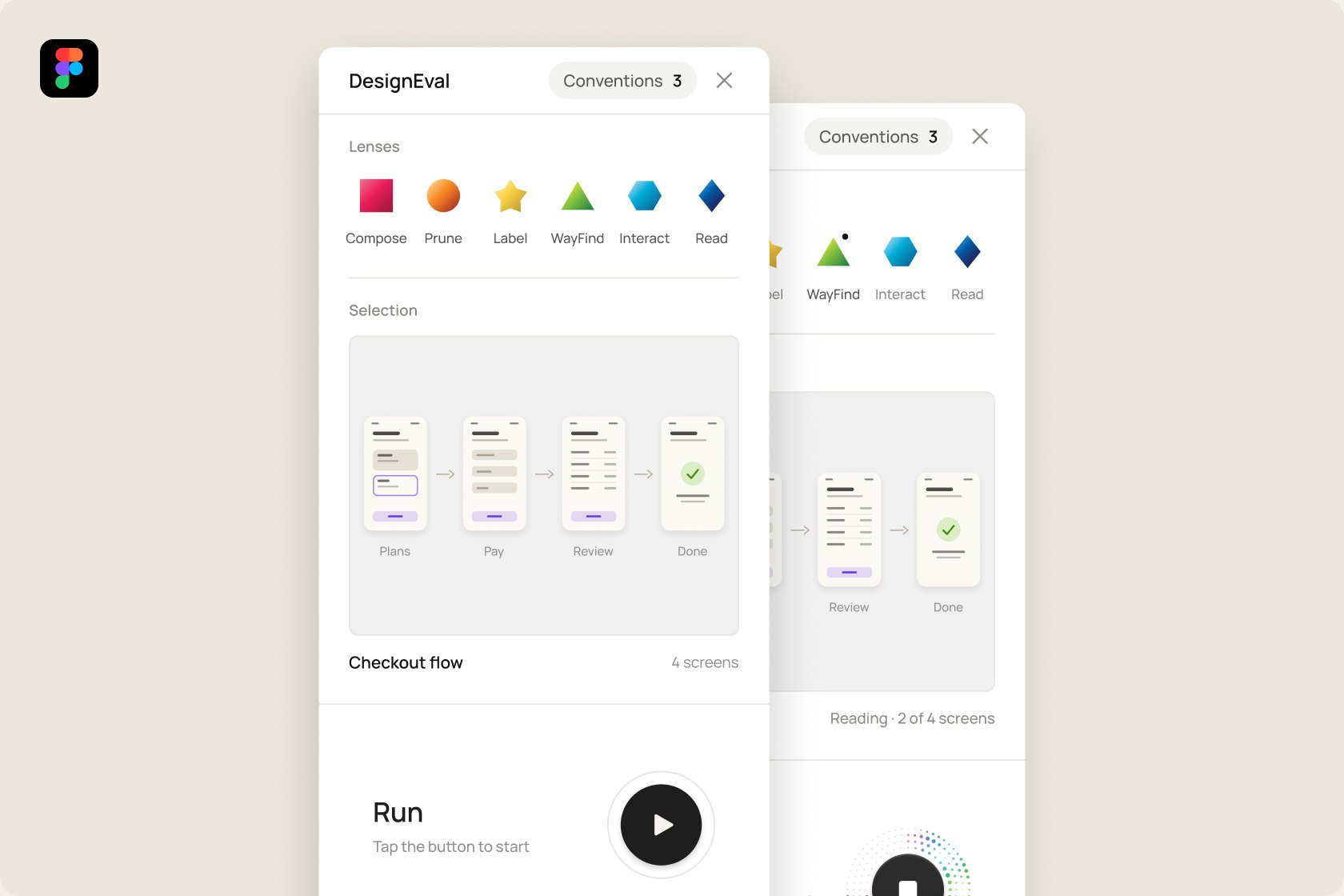
The DesignEval plugin panel in Figma, with the six lenses, a selected checkout flow and the Run control

Six lenses. Fifty eight points. One craft.

Compose 79

9 checks

Prune 75

9 checks

Label 75

10 checks

WayFind 75

9 checks

Interact 80

11 checks

Read 77

10 checks

Compose.

Can you see the clusters before you read them?

The brain clusters what it sees almost instantly. Things close together read as one. Things inside a boundary read as another. Shared shapes tie items together. Your eyes hop continuously toward whatever stands out most. When things aren’t organized into logical zones, the brain works harder than it should. That's friction, and friction delays action. The Compose Lens helps you arrange things so the layout comes into sharper focus.

Prune.

Is it earning its place?

The brain settles on the simplest reading of what it sees and lets the rest fall away. Because working memory can only hold three or four things at once. Everything on a screen competes for that attention, so every extra element takes attention away from the ones that matter most. When a screen carries too much, the important things stop standing out, and people hesitate or miss them. In design it can be difficult to exercise reduction, but it's a power move when done with discipline. The best part is disciplined reduction often leads to a more satisfying overall aesthetic and experience. The Prune Lens helps you find the few small cuts that leave the purpose of a screen unmistakable, so what matters most gets the attention it deserves with the least effort.

Label.

Does what comes next match what was promised?

Every word and symbol a person meets is a promise about what happens next, and whatever follows, a new view, a message, a change of state, should confirm it. Well described experiences set expectations and meet them. That's because the brain reads by prediction, matching each word and symbol against what it has seen before, and when those matches happen moment to moment the whole thing feels effortless. When a label and its icon disagree, a button and what it leads to don't match, or content doesn’t match its own description, people slow down and second-guess, no matter how subtle the disconnect. It's similar to the way your foot drops when you expect one more stair and there isn't one. Nobody reports it, but everyone experiences it. Each pause breaks momentum, and the losses add up across users and sessions. The Label Lens helps you keep every promise the experience makes, so the momentum keeps going the way you intended.

WayFind.

Do I know where I am, and what this space is for?

Walk into a room and you know what it is before you've read anything. The shape, the furniture and the light tell you about the kitchen, bathroom, lobby, and whether it's someone's home or a public building. Digital experiences work the same way. People build mental maps of them, and the brain uses the same machinery it uses for physical space. A view should tell people the kind of place they're in, where it sits in the whole, and what it's for, through its layout, its structure and its visual language. When those cues are strong, people continue with confidence. When they're weak, people stop to get their bearings. They scroll away, go back, start over, or worse, abandon the effort. The WayFind Lens helps you strengthen the spatial cues so people have a strong mental map of where they are and what they can do there.

Interact.

Does the interaction fit the moment?

Everyone carries a mental model of how a thing should behave. When the interaction design match that model, people stop thinking about the interface and act. Repeated actions become habits that the brain runs on autopilot. A card peeking past the edge tells the eye there's more to see. The task in front stays clear while its surroundings sit quietly behind it. Things that move together read as belonging together. Bigger, closer targets are faster to reach. None of this means every interaction has to be one people have seen before. New interaction models get invented all the time, and the best of them become the conventions everyone leans on later. Some moments call for a tried and true pattern. Some deserve something new. Either way, the choice should be grounded in how people perceive and move, and in what the moment calls for. Every interaction has to answer two questions: is it the right one for the job, and is it done well? A well-built interaction can still be the wrong one, and the right one can still be built badly. The Interact Lens helps you put all of this to work for the hand, the eye and the habit, so whatever you build feels intentional, useful and a pleasure to use.

Read.

Can I read the system without effort?

Type on a screen is a system. A headline, a label, a button and a long read each do a different job and play by different rules. The eye reads body copy by hopping along each line a handful of letters at a time, and it recognizes words by their shapes, so for fast comprehension the faces with the strongest word shapes perform best. Readability comes from good contrast and functional character anatomy. Line spacing tells the eye which lines belong together. Open it up and the reading pace eases. Open it further and each line becomes its own thought. Line length matters too. A short line lets the eye return gracefully to the start of the next one. A long line makes it re-find its place every time. Headlines can afford to lean harder into aesthetics, because they're short and they benefit from sheer scale. There are high performing faces in every anatomical category, so the choice is less about the category and more about the job. Across the whole screen, the system works when there's a clear order of importance and nothing competing for it. Too many faces, sizes, weights or colors and the hierarchy flattens. Typography sets the tone before a word is read, so every choice should be deliberate. The Read Lens helps you set type with a clear hierarchy and restraint, so every level reads without effort and every choice looks like it was made with function and taste.

Figma Plugin · Closed Beta Coming Soon

Design well. Run the evals.

First 2 months · Founder price

$7/ month, then $10 monthly

  • 30 free AI runs during beta
  • Early access, before public launch
  • Your feedback shapes the product

Regular price

$10/ month

  • 5 free AI runs
  • 75 AI runs a month included
  • $5 for 30 runs, top-ups available